반응형
1. X-MS-CLIENT-PRINCIPAL 사용
AuthN/AuthZ에서 사용자 ID 작업 - Azure App Service
Azure App Service에서 기본 제공 인증 및 권한 부여를 사용할 때 사용자 ID에 액세스하는 방법을 알아봅니다.
learn.microsoft.com
- App Service에 대해 ID 공급자 인증을 사용하게 되면 EntraID를 통해 앱에 접근할 수 있다.
- 앱에 사용자 정보를 넘겨줄 때 쓰는 X-MS-CLIENT-PRINCIPAL 라는 공식 헤더를 사용.
- 본 코드는 php 언어를 사용.
<?php
/**
 * index.php (단일 파일)
 * - Azure App Service Easy Auth(Entra ID) 사용 가정
 * - App Role: admin, viewer1
 * - admin: 업로드 가능
 * - viewer1: 업로드 UI 비활성 + 서버 업로드 차단(403)
 */

// -------------------------
// 설정
// -------------------------
$MAX_BYTES = 10 * 1024 * 1024; // 10MB
$ALLOWED_EXT = ['jpg','jpeg','png','gif','pdf','txt','zip'];
$UPLOAD_DIR = __DIR__ . DIRECTORY_SEPARATOR . 'uploads';

// -------------------------
// Easy Auth: roles/username 읽기
// -------------------------
function get_client_principal(): ?array {
    $h = $_SERVER['HTTP_X_MS_CLIENT_PRINCIPAL'] ?? '';
    if ($h === '') return null;

    $json = base64_decode($h, true);
    if ($json === false) return null;

    $data = json_decode($json, true);
    return is_array($data) ? $data : null;
}

function get_claims_map(): array {
    $cp = get_client_principal();
    if (!$cp || !isset($cp['claims']) || !is_array($cp['claims'])) return [];

    $out = [];
    foreach ($cp['claims'] as $c) {
        $typ = $c['typ'] ?? null;
        $val = $c['val'] ?? null;
        if (!$typ || $val === null) continue;
        $out[$typ][] = $val;
    }
    return $out;
}

function get_roles(): array {
    $c = get_claims_map();
    $roles = array_merge(
        $c['roles'] ?? [],
        $c['http://schemas.microsoft.com/ws/2008/06/identity/claims/role'] ?? []
    );
    $roles = array_values(array_unique($roles));
    return $roles;
}

function get_username(): string {
    $c = get_claims_map();
    // 환경마다 들어오는 클레임이 다를 수 있어 후보를 여러 개 둠
    foreach (['preferred_username', 'name', 'upn', 'http://schemas.xmlsoap.org/ws/2005/05/identity/claims/name'] as $k) {
        if (!empty($c[$k][0])) return $c[$k][0];
    }
    return 'unknown';
}

function has_role(string $role): bool {
    return in_array($role, get_roles(), true);
}

// -------------------------
// 응답 헬퍼
// -------------------------
function html_escape(string $s): string {
    return htmlspecialchars($s, ENT_QUOTES | ENT_SUBSTITUTE, 'UTF-8');
}

function ensure_upload_dir(string $dir): void {
    if (!is_dir($dir)) {
        if (!mkdir($dir, 0755, true)) {
            throw new RuntimeException("Failed to create upload dir");
        }
    }
}

// -------------------------
// 업로드 처리 (POST)
// -------------------------
$upload_result = null;
$upload_error = null;

$is_logged_in = (get_client_principal() !== null); // Easy Auth가 켜져 있으면 로그인 후에만 principal이 들어옴
$roles = get_roles();
$username = get_username();

$is_admin = has_role('admin');
$is_viewer1 = has_role('viewer');

if (($_SERVER['REQUEST_METHOD'] ?? 'GET') === 'POST') {
    // 서버단 보안: admin만 업로드 허용
    if (!$is_admin) {
        http_response_code(403);
        $upload_error = "Forbidden: 업로드 권한이 없습니다. (admin만 가능)";
    } else {
        try {
            if (!isset($_FILES['file'])) {
                throw new RuntimeException("file 필드가 없습니다.");
            }

            $f = $_FILES['file'];
            if (!isset($f['error'], $f['tmp_name'], $f['name'], $f['size'])) {
                throw new RuntimeException("업로드 데이터가 올바르지 않습니다.");
            }

            if ($f['error'] !== UPLOAD_ERR_OK) {
                throw new RuntimeException("업로드 에러 코드: " . $f['error']);
            }

            if ($f['size'] > $MAX_BYTES) {
                throw new RuntimeException("파일이 너무 큽니다. 최대 " . ($MAX_BYTES / 1024 / 1024) . "MB");
            }

            $orig = $f['name'];
            $ext = strtolower(pathinfo($orig, PATHINFO_EXTENSION));

            if ($ext === '' || !in_array($ext, $ALLOWED_EXT, true)) {
                throw new RuntimeException("허용되지 않는 확장자입니다. 허용: " . implode(', ', $ALLOWED_EXT));
            }

            ensure_upload_dir($UPLOAD_DIR);

            // 파일명 랜덤화(보안) + 원본명은 기록용으로만
            $random = bin2hex(random_bytes(16));
            $safeName = $random . '.' . $ext;
            $dest = $UPLOAD_DIR . DIRECTORY_SEPARATOR . $safeName;

            if (!move_uploaded_file($f['tmp_name'], $dest)) {
                throw new RuntimeException("파일 저장에 실패했습니다.");
            }

            $upload_result = [
                'original_name' => $orig,
                'saved_as' => $safeName,
                'size' => $f['size'],
            ];
        } catch (Throwable $e) {
            $upload_error = $e->getMessage();
        }
    }
}
?>
<!doctype html>
<html lang="ko">
<head>
  <meta charset="utf-8" />
  <meta name="viewport" content="width=device-width, initial-scale=1" />
  <title>Upload Demo (admin vs viewer1)</title>
  <style>
    body { font-family: system-ui, -apple-system, Segoe UI, Roboto, "Noto Sans KR", Arial, sans-serif; margin: 24px; }
    .box { border: 1px solid #ddd; border-radius: 10px; padding: 16px; max-width: 720px; }
    .row { margin: 8px 0; }
    .muted { color: #666; font-size: 14px; }
    .ok { color: #0a7; }
    .bad { color: #c00; }
    button[disabled], input[disabled] { opacity: 0.5; cursor: not-allowed; }
    code { background: #f6f6f6; padding: 2px 6px; border-radius: 6px; }
  </style>
</head>
<body>
  <h2>업로드 페이지</h2>

  <div class="box">
    <div class="row">
      <b>로그인 사용자:</b>
      <span><?= html_escape($username) ?></span>
    </div>

    <div class="row muted">
      <b>Roles:</b>
      <span><?= html_escape(implode(', ', $roles) ?: '(none)') ?></span>
    </div>

    <?php if (!$is_logged_in): ?>
      <p class="bad">Easy Auth principal이 없습니다. (로그인/인증 설정 확인 필요)</p>
      <p class="muted">App Service Authentication이 켜져 있고, 인증 필요로 설정되어 있어야 합니다.</p>
    <?php else: ?>
      <?php if ($is_admin): ?>
        <p class="ok">admin 권한입니다. 업로드 가능 ✅</p>
      <?php elseif ($is_viewer1): ?>
        <p class="bad">viewer1 권한입니다. 업로드 불가 ❌</p>
      <?php else: ?>
        <p class="bad">권한이 애매합니다. admin이 아니면 업로드 불가로 처리합니다. ❌</p>
      <?php endif; ?>

      <?php if ($upload_error): ?>
        <div class="row bad"><b>업로드 실패:</b> <?= html_escape($upload_error) ?></div>
      <?php endif; ?>

      <?php if ($upload_result): ?>
        <div class="row ok"><b>업로드 성공!</b></div>
        <div class="row muted">
          원본: <code><?= html_escape($upload_result['original_name']) ?></code><br/>
          저장: <code><?= html_escape($upload_result['saved_as']) ?></code><br/>
          크기: <code><?= html_escape((string)$upload_result['size']) ?> bytes</code>
        </div>
      <?php endif; ?>

      <hr/>

      <?php
        // viewer1이면 UI 비활성화
        $ui_disabled = !$is_admin;
      ?>

      <form method="post" enctype="multipart/form-data">
        <div class="row">
          <input type="file" name="file" <?= $ui_disabled ? 'disabled' : '' ?> />
        </div>

        <div class="row">
          <button type="submit" <?= $ui_disabled ? 'disabled' : '' ?>>업로드</button>
        </div>

        <div class="row muted">
          허용 확장자: <?= html_escape(implode(', ', $ALLOWED_EXT)) ?> /
          최대 용량: <?= html_escape((string)($MAX_BYTES / 1024 / 1024)) ?>MB
        </div>

        <?php if ($ui_disabled): ?>
          <div class="row muted">
            <b>안내:</b> viewer1(또는 admin 아님)은 버튼이 비활성화됩니다.
          </div>
        <?php endif; ?>
      </form>
    <?php endif; ?>
  </div>

  <p class="muted" style="margin-top:12px;">
    서버 보안: viewer1이 개발자도구로 강제로 POST를 보내도 <code>403</code>으로 차단됩니다.
  </p>
</body>
</html>- 간단한 업로드 폼 (코드)
2. ID 공급자 인증 추가
빠른 시작 - 웹앱에 앱 인증 추가 - Azure App Service
Azure App Service에서 실행되는 웹앱에 대해 앱 인증을 사용하도록 설정하는 방법을 알아봅니다. 웹앱에 액세스할 수 있는 사람을 조직 내 사용자로 제한합니다.
learn.microsoft.com
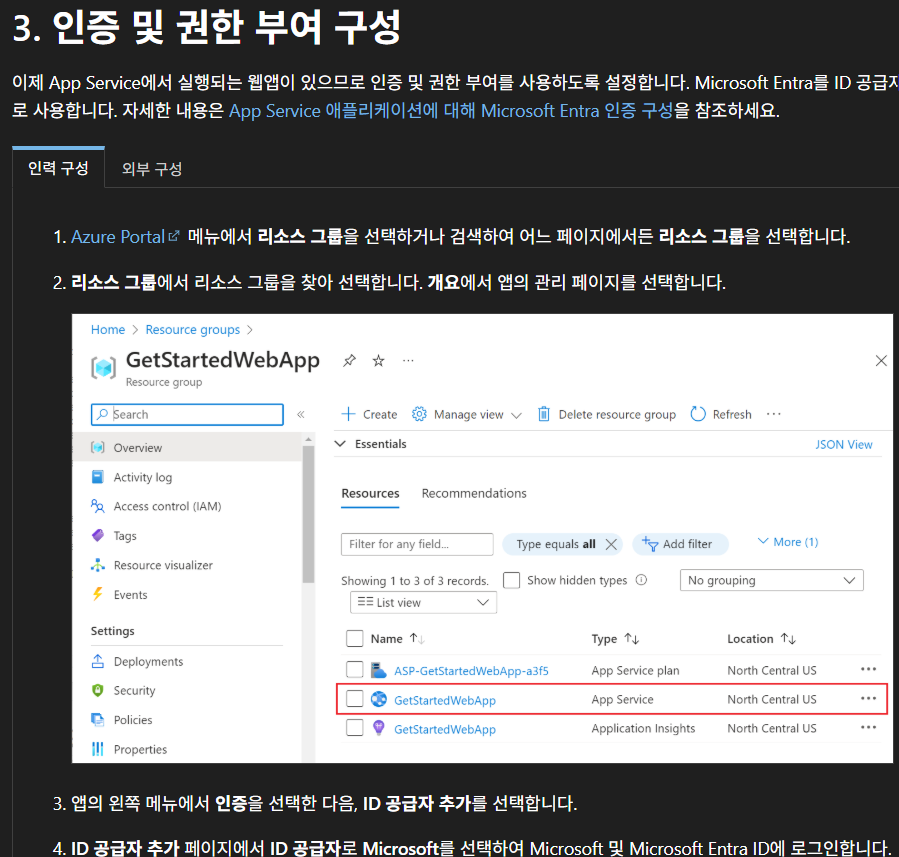
- ID 공급자 추가를 통해 Microsoft Entra ID에 로그인.
- 공급자를 추가 하게 되면 새 앱이 추가.
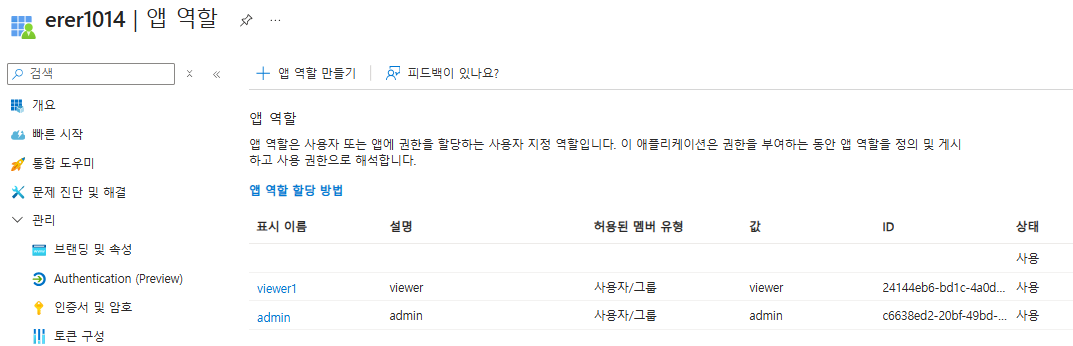
- 앱 역할을 따로 admin, viewer로 만들어준다.
- 값도 물론 똑같이 admin, viewer.

- 엔터프라이즈 에플리케이션에 들어가 업로드 폼을 사용할 사람과 사용하지 않을 사람을 구분해서 역할을 부여해 준다.
3. 인증/인가를 통해 App Service(WEB)에 접속한 모습

- A 이메일을 통해 로그인 한 경우 App Roles 대한 value 값이 admin인 경우에 업로드 폼 활성화
- B 이메일을 통해 로그인 한 경우 App Roles 대한 value 값이 viewer인 경우 업로드 폼 비활성화
반응형
'서버 > Azure' 카테고리의 다른 글
| [Azure] Container Insight와 Log Analytics(Alert 생성) (0) | 2026.01.14 |
|---|---|
| [Azure] App Service, APIM 에 대한 DR, SLA 관련 (0) | 2026.01.07 |
| [Azure] Private 환경에서 AppService 접근 (0) | 2025.12.12 |
| [Azure] Application Gateway for Containers (0) | 2025.11.28 |
| [Azure] Frontdoor + Private Link + AppGW (0) | 2025.11.27 |


