Azure Managed Lustre 파일 시스템의 필수 구성 요소 - Azure Managed Lustre File System
Azure Managed Lustre 파일 시스템을 만들기 전에 완료해야 하는 네트워크 및 스토리지 필수 구성 요소에 대해 알아봅니다.
learn.microsoft.com
기본적으로 Lustre는 Blob 스토리지와 통합이 가능하다.
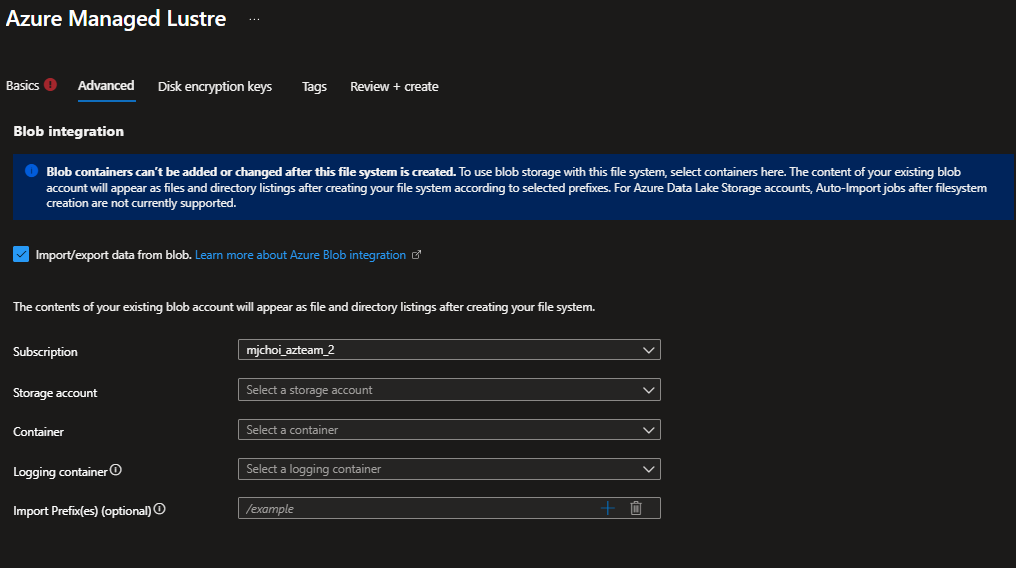
그래서 일반적인 구성으로는 Lustre에는 핫 데이터, 콜드 데이터는 Blob에 저장하는 방식으로 많이 사용한다.
하지만 사용하기 위해서는 Lustre가 Blob에 대한 기여자 역할이 있어야 액세스가 가능하기에 권한 할당을 해줘야 한다.
제대로 된 권한 할당이 이루어지지 않으면 해당 오류코드가 나오게 된다.
Storage Container /subscriptions/3dd2ea2e-9a31-4d41-8974-afdbf2bbaec1/resourceGroups/integration/providers/Microsoft.Storage/storageAccounts/blobintegration/blobServices/default/containers/blob-container is not found or is inaccessible.(코드: InvalidParameter, 대상: amlFilesystem.hsm.settings.container
문제를 해결하기 위해서는 위 Azure 독스 문서를 참고하면 된다.
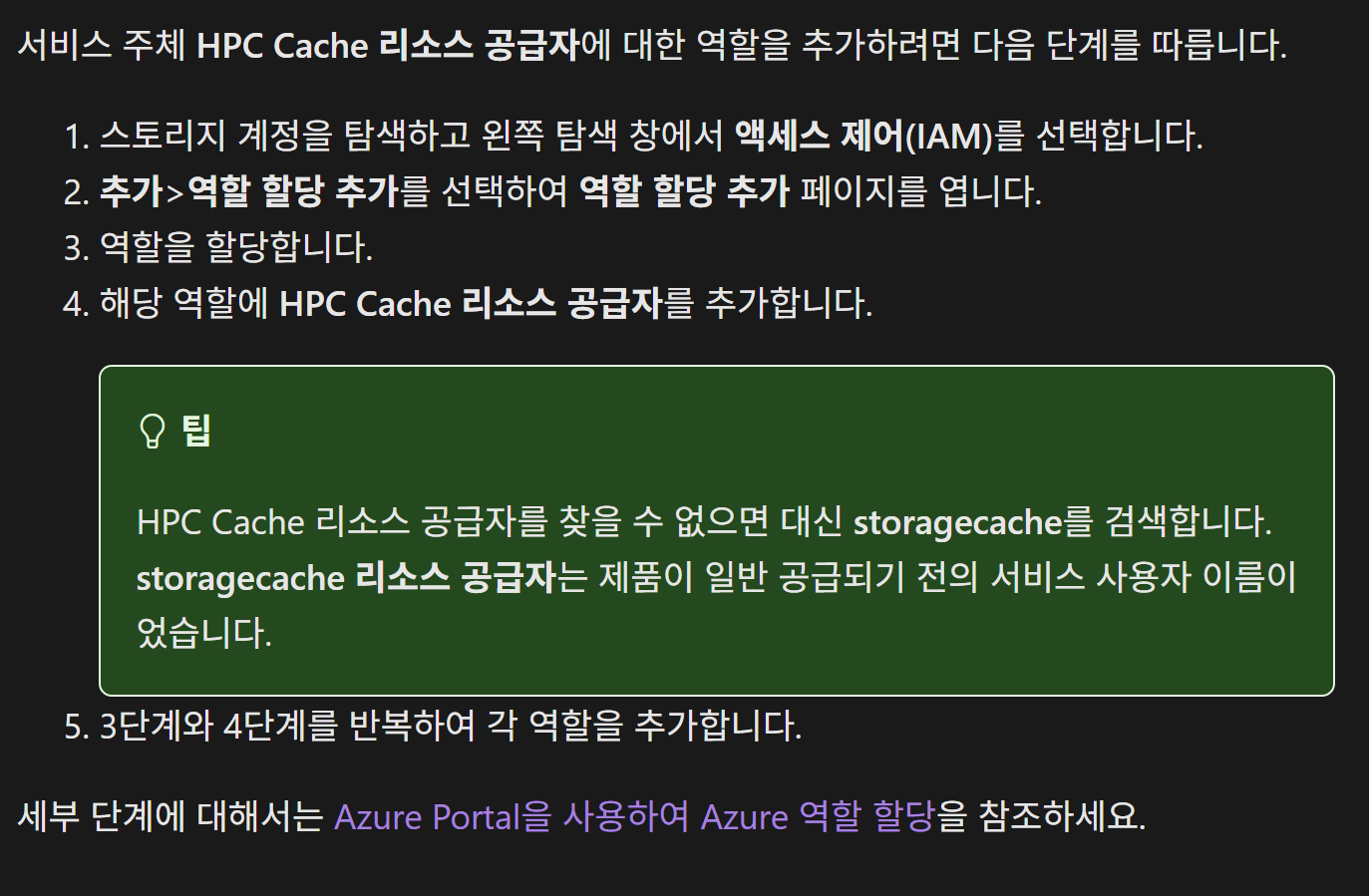
Lustre는 내부적으로 HPC Cache 리소스 공급자(Microsoft.StorageCache 리소스 프로바이더)를 통해 Blob Storage와 연동된다. 따라서 스토리지 계정에 Lustre가 붙으려면, HPC Cache 리소스 공급자 자체에 접근 권한을 주어야 한다.
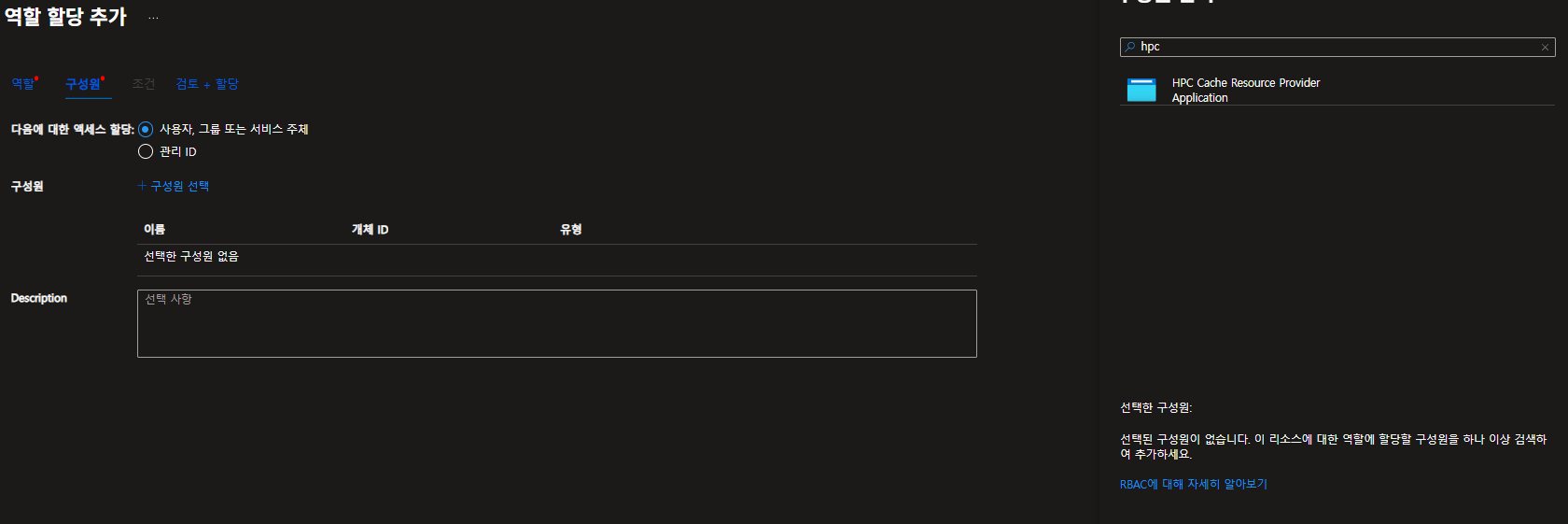
통합하고자 하는 Blob 스토리지에 각 역할(스토리지 계정 기여자, Storage Blob 데이터 Contributor)을 부여하고 Service Principal 공급자를 HPC Cache Resource Provider로 추가하여 할당해주면 된다.
Terraform 코드
terraform {
  required_providers {
    azurerm = {
      source  = "hashicorp/azurerm"
      version = "~> 4.46.0"
    }
  }
}

provider "azurerm" {
  features {}
  subscription_id = "구독id"
  tenant_id       = "테넌트id"
}

# -------------------------------
# Storage Account + Containers
# -------------------------------
resource "azurerm_storage_account" "sa" {
  name                     = "blobintegrationdemo1014"
  resource_group_name      = "integration"
  location                 = "Korea Central"
  account_tier             = "Standard"
  account_replication_type = "LRS"
}

resource "azurerm_storage_container" "data" {
  name                  = "blob-container1014"
  storage_account_id    = azurerm_storage_account.sa.id
  container_access_type = "private"
}

resource "azurerm_storage_container" "logs" {
  name                  = "log-container1014"
  storage_account_id    = azurerm_storage_account.sa.id
  container_access_type = "private"
}

# -------------------------------
# Azure Managed Lustre File System
# -------------------------------
resource "azurerm_managed_lustre_file_system" "lustre" {
  name                = "lustre-blob1014"
  resource_group_name = "integration"
  location            = "Korea Central"

  # Premium SKU 최소 16TB 필요
  sku_name               = "AMLFS-Durable-Premium-40"
  storage_capacity_in_tb = 48

  subnet_id = "/subscriptions/3dd2ea2e-9a31-4d41-8974-afdbf2bbaec1/resourceGroups/private-aks/providers/Microsoft.Network/virtualNetworks/private-vm/subnets/default"
  zones     = ["1"]

  maintenance_window {
    day_of_week        = "Sunday"
    time_of_day_in_utc = "22:00"
  }

  # Blob Integration (HSM)
  hsm_setting {
    container_id         = azurerm_storage_container.data.id
    logging_container_id = azurerm_storage_container.logs.id
  }

	depends_on = [
		azurerm_storage_container.data,
		azurerm_storage_container.logs,
		azurerm_role_assignment.lustre_sa_contrib,
		azurerm_role_assignment.lustre_blob_contrib
	  ]
}

# -------------------------------
# Role Assignments for HPC Cache RP
# -------------------------------
locals {
  hpc_cache_sp_id = "037fc5fd-174c-4b47-9067-b8e2d0b260ee" # hpc 리소스 아이디
}

resource "azurerm_role_assignment" "lustre_sa_contrib" {
  scope                = azurerm_storage_account.sa.id
  role_definition_name = "Storage Account Contributor"
  principal_id         = local.hpc_cache_sp_id
  principal_type       = "ServicePrincipal"
}

resource "azurerm_role_assignment" "lustre_blob_contrib" {
  scope                = azurerm_storage_account.sa.id
  role_definition_name = "Storage Blob Data Contributor"
  principal_id         = local.hpc_cache_sp_id
  principal_type       = "ServicePrincipal"
}
'서버 > Azure' 카테고리의 다른 글
| [Azure] VPN Gateway를 통해 Private AKS 접근 (P2S) (0) | 2025.10.02 |
|---|---|
| [Azure] AKS Node Pool (Node)에 SSH로 안전하게 접속 (0) | 2025.09.30 |
| [Azure] AKS 클러스터 GPU 기반 구축 이론 (실습 X) (1) | 2025.09.12 |
| [Azure] AKS ACR과 ArgoCD GitOps 배포 (feat 불변 태그 전략) (0) | 2025.09.05 |
| [Azure] SSL/TLS End-to-End (feat Service Mesh) (2) | 2025.08.21 |


